Know which AI tools your team uses.
IT Services edition · Industry guide and worked example included
Bring scattered AI use into one clear inventory, with the questions and next actions your team needs.
For you if nobody can say which AI tools your people use on client work.
Plan 45 to 60 minutes to set up, allow a one-week survey window, then 30 minutes for the initial review. Follow-up and evidence collection take additional time. Planning estimates assume the relevant information is available. They are not completion or approval guarantees.
See what you’ll have readyAlso in AI Readiness Bundle · $649 or AI Foundation Bundle · $599 or AI Management Bundle · $849.
Why not a spreadsheet?
| Recurring task | With this kit | With a basic spreadsheet |
|---|---|---|
| Chasing teams that have not responded | Each team’s coverage record shows people invited, responses received and the reason anything is missing. The report keeps the gap in view. | Who replied lives in another tab or an inbox, and the gap disappears from the summary. |
| The quarterly review | Every use has an owner and a next review date, so the review starts from the same record. | Owners and dates drift across copies, and the list is rebuilt each quarter. |
| A decision someone questions later | Each decision keeps its reason, conditions, owner and date next to the use. | A cell says Approved. The reason is in an email thread. |
| The leadership report | The report is generated from the same record: uses, risks, coverage gaps and the action handover. | Someone writes the summary by hand, each time. |
Actions export as CSV for the tracker your team already uses. The kit records what people disclose and what you review. It does not scan devices or monitor staff.
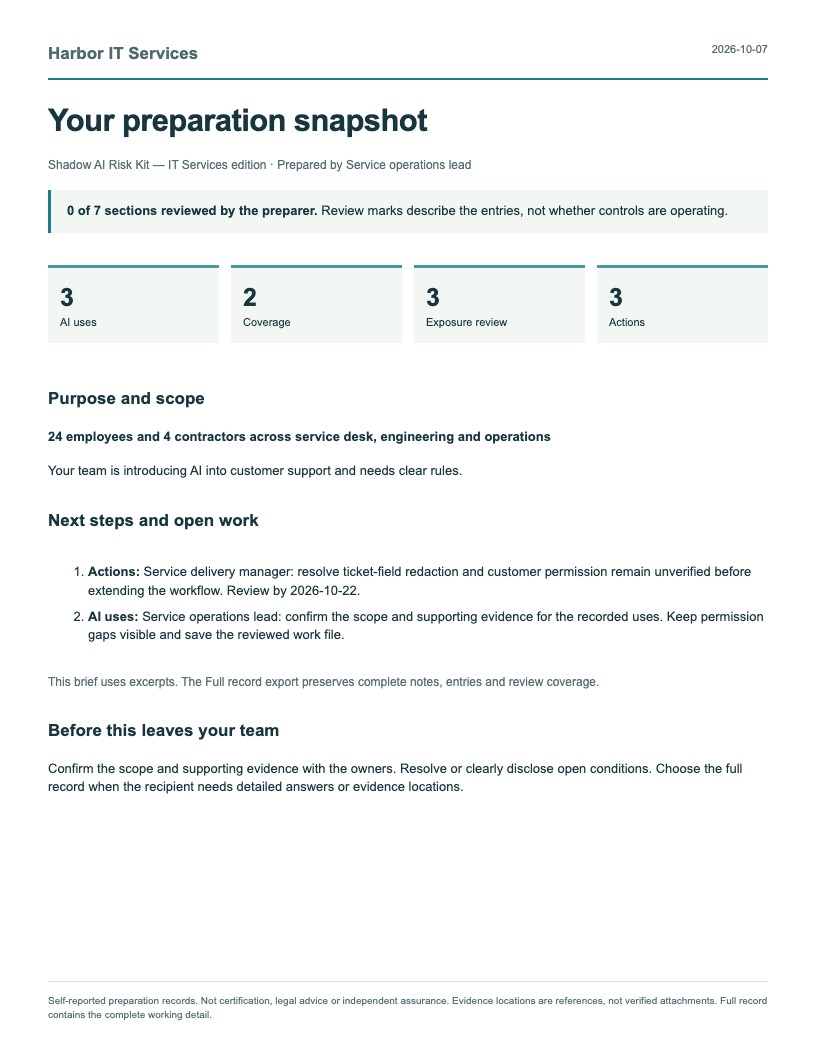
A worked case: one disclosure round at an IT provider.
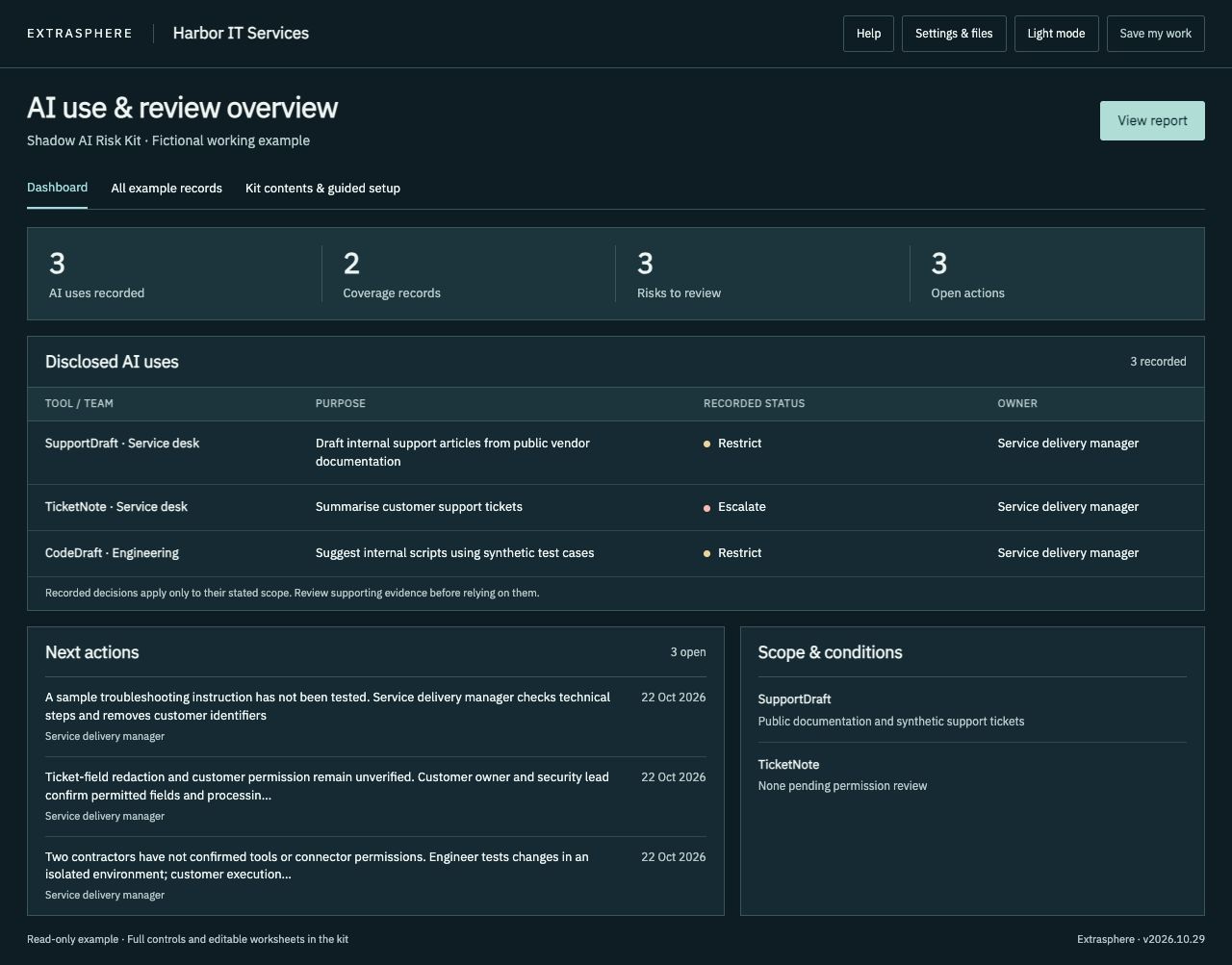
Harbor IT Services is a fictional managed IT provider. Here is one round with the Shadow AI Risk Kit, from the first responses to the follow-up.
01 Disclosure round
The kit’s staff survey goes to four groups. Each group gets a coverage record.
Coverage ID Team or source Invited Received Coverage Missing information and reason C-1 Service desk 12 12 Reviewed All responses reviewed with the team lead. C-2 Engineering 8 8 Reviewed All responses reviewed. C-3 Projects 5 0 Not started No responses after one week. Reminder sent October 15, 2026. C-4 Contractors 4 2 Partial Two contractors have not confirmed their tools or connector permissions. The Projects team has not responded. It stays in the record as Not started, with the reason.
02 An uncertain tool use
- Use ID
- U-4
- Tool or embedded feature
- A page-summary browser extension, name not yet known
- Team / role
- Service desk
- Account or plan
- Unknown
- Evidence confidence
- Unverified
- Uncertain disclosure
- “I pasted ticket text into a summarizer extension. Not sure which one.”
03 An accountable owner
The service operations lead owns the disclosure round and the review. The service delivery manager owns decisions about tools that touch tickets.
04 A review decision with a reason
- Decision
- D-4 · Restrict
- Conditions
- No ticket text in browser extensions until the extension and account are identified.
- Reason
- Tickets can hold customer contacts and credentials, and the account type is unknown.
- Decision owner
- Service delivery manager · October 16, 2026
- Next review
- October 30, 2026
05 The action handover, into the existing tracker
The Actions list exports as CSV. The service desk imports it into the ticket tracker it already uses, and each task keeps its action ID so the next review can match tracker status to the record.
Action ID,Related use ID,Action and completion evidence needed,Owner,Due date,Status
A-4,U-4,Identify the extension and account; record them in U-4,Service delivery manager,2026-10-23,Planned
A-5,,Collect the Projects team responses; update C-3,Service operations lead,2026-10-22,In progress
A-6,U-4,Remind the service desk: no ticket text in extensions until A-4 closes,Service delivery manager,2026-10-17,Completed
06 Unresolved coverage stays visible
The report’s Coverage & gaps page lists Projects (0 of 5) and Contractors (2 of 4) with their reasons, so nobody reads the review as complete. They stay open until the responses arrive.
Fictional records. The kit records what people disclose and what you review. It does not scan devices or monitor staff.
What you’ll have ready
- An inventory you can work from
- Record the tools people use, who uses them, and where client information is involved.
- A focused risk review
- Review the uses that need attention and capture what you still need to find out.
- A next-action list
- Give follow-up work a named owner and take the report to your next team review.
Based on disclosures and records you review. It does not scan devices or monitor staff.
Start where you are
Start with your current tool list. If you do not have one, send the included eight-question staff survey.
Excel and CSV import included.
- Bring your AI inventory and action records.
- Match the columns and review duplicates before adding them to the dashboard.
- Choose Manual import, or Prepare a file with your AI with the included prompt and your work-approved assistant.
- Manual import works without any AI tool. Your file is read on your computer and nothing is sent anywhere.
Free guides: What is shadow AI? A practical guide · AI vendor risk assessment: what to check
Gather the facts
Use existing records and staff responses to record how AI is used.
Review the gaps
Check the entries with the people doing the work. Identify the uses that need attention.
Share the next actions
Review the report and move agreed actions into the place your team already tracks work.
See the workspace
Download the ZIP, extract it, and open START-HERE.html in a current desktop version of Chrome, Edge, Safari or Firefox. Save your work file to keep a copy you can load next time.
Files included in your download
- START-HERE.html The local dashboard. Open this after you extract the folder.
- Sample-Dashboard.html A completed fictional Harbor IT Services example to explore.
- Sample-Report.pdf The fictional example’s report, watermarked Fictional example.
- Sample-Report.html The same fictional report as a web page.
- KIT-GUIDE.html What each part of the kit is for.
- INDUSTRY-GUIDE.html Questions, examples and starting points for your industry.
- AI-Completion-Guide.html Optional prompts for your approved AI assistant. You review every answer.
- AI-Inventory-Import.csv Column headings for importing an AI inventory.
- Staff-Briefing.html A short briefing you can walk through with the team.
- STAFF-EXERCISE.txt A short exercise to run with your team.
- STAFF-SURVEY.txt Eight questions and the email that sends them. Import the sheet in the dashboard.
- Reference/License-and-scope.txt A copy of your license.
- Reference/Sources-and-scope.txt Sources, scope and the package revision.
- Reference/Templates.docx Editable working materials.
- READ-ME-FIRST.txt The first steps, in order.
- CHECK-YOUR-COMPUTER.html A one-minute check before you start on a work laptop.
- IF-SOMETHING-IS-BLOCKED.txt What to try, and what to send IT, if a browser blocks a file.
- LICENSE.txt, PURCHASE-TERMS.txt and REFUND-POLICY.txt Your license, purchase terms and refund policy.
- manifest.json Every file with its SHA-256 checksum, to check your download.
Using this with other kits
Use the inventory in your existing tool review or policy process. If you also use the Policy kit, transfer the records with Move records to another kit and review them before approving any tool.
Questions
License
Standard kits cover internal use by one purchasing company. A consultancy can use a standard kit for its own business. Delivering branded kit copies to clients requires the separate Practitioner License and its client allocations.
Updates
Updates are included for 12 months from purchase.
Refund
Not the right fit? Contact us within 14 days of purchase for a refund. See our refund policy.
Built around IT consultancies and managed service providers
Document AI use in support, knowledge work and customer delivery, with named reviewers and practical handover records.
- Can a ticket contain credentials or customer personal information?
- Who authorizes connectors and actions in customer systems?
- Which customer restrictions override your standard process?
Your download includes INDUSTRY-GUIDE.html, STAFF-EXERCISE.txt and a worked Harbor IT Services example alongside the complete core kit. The editable workspace starts with your own blank records.
Examples cover organizational decisions and records. The kit does not inspect tenants, scan endpoints or implement technical controls. Each client company needs its own license.