Make the next AI tool decision clear.
Software edition · Industry guide and worked example included
Keep AI requests, decisions and follow-up together. Give your existing decision-makers a clear record and a leadership-ready report.
For you if you have an AI policy and people keep asking whether they can use a new tool.
About 15 to 30 minutes to a first useful entry, and 2 to 3 hours for a full setup. After that, plan about 30 minutes a month to review requests, decisions and follow-up. Planning estimates assume the relevant information is available. They are not completion or approval guarantees.
See what you’ll have readyAlso in AI Foundation Bundle · $599 or AI Management Bundle · $849.
What you’ll have ready
- A record of AI uses
- Keep the purpose, owner and relevant notes for each use in one register.
- Decisions with conditions
- Record what was decided, by whom, and what needs to happen next.
- A leadership report and a one-page brief
- Bring the current uses, decisions and outstanding work into your next review, or print the one-page brief.
Includes twelve editable governance templates, six optional Draft with AI prompts and a fictional worked example. Reports print, save as PDF or download as HTML; records export to CSV and Excel. Word documents are in other kits: client-ready Word answers in the AI Questionnaire Response Kit, and the Word policy in the AI Policy & Rollout Kit, which also adds policy assembly and a dedicated rollout workflow.
A question from a client
“Our security review needs your AI tool approvals before contract.”
Recorded as
- Conditions
- Reason: vendor assessment attached and inputs limited to published release notes and synthetic examples. Condition: Product owner checks actual behavior and avoids unsupported security or AI claims.
- Owner
- Engineering manager
- Reviewer
- Engineering manager
Reported as
Cedar Cloud SoftwareOct 16, 2026AI decisionsLeadership report · Decisions, conditions and current usesDecisions and conditionsTool / requestRecorded decisionOwnerReviewerDocsDraftApproved with conditionsEngineering managerEngineering managerGot this from a client questionnaire? The AI Questionnaire Response Kit answers it. See the kit · $399
Start where you are
Bring one live AI request and the relevant policy or prior decision. Use the owners and review meetings you already have.
Excel and CSV import included.
- Bring your AI inventory and action records.
- Match the columns and review duplicates before adding them to the dashboard.
- Choose Manual import, or Prepare a file with your AI with the included prompt and your work-approved assistant.
- Manual import works without any AI tool. Your file is read on your computer and nothing is sent anywhere.
Free guides: What is AI governance? A practical guide · AI risk assessment template: what to assess
Record the request
Capture the proposed use and the information your decision-maker needs.
Keep the decision
Record the review outcome, conditions and follow-up owner.
Share the update
Review the leadership report and add the actions to your existing work tracker.
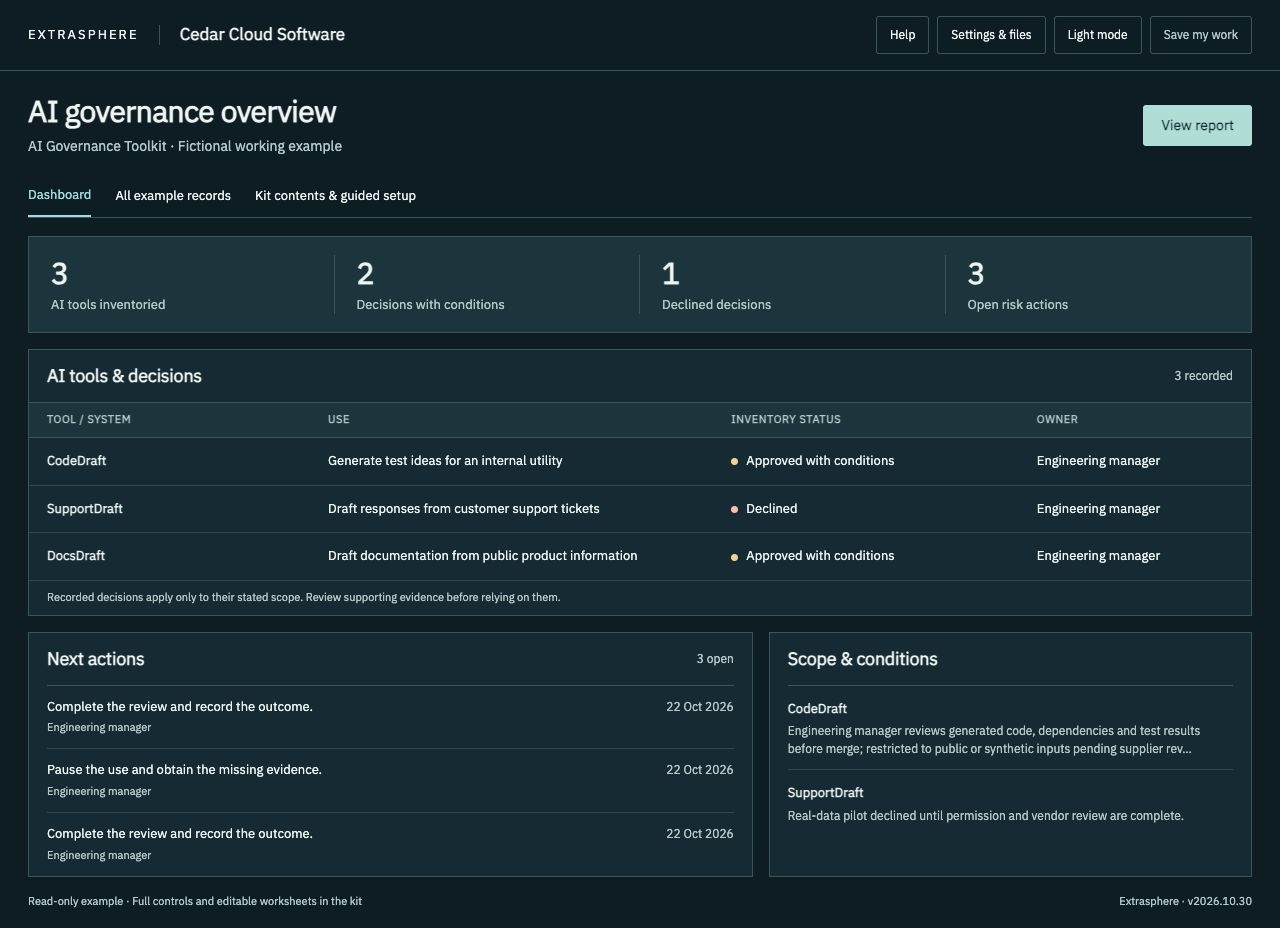
See the workspace
Download the ZIP, extract it, and open START-HERE.html in a current desktop version of Chrome, Edge, Safari or Firefox. Save your work file to keep a copy you can load next time.
Files included in your download
- START-HERE.html The local dashboard: register, decisions, and the leadership report.
- Sample-Dashboard.html A completed fictional Cedar Cloud Software example to explore.
- Sample-Report.pdf The fictional example’s report, watermarked Fictional example.
- Sample-Report.html The same fictional report as a web page.
- KIT-GUIDE.html What each part of the kit is for.
- INDUSTRY-GUIDE.html Questions, examples and starting points for your industry.
- AI-Completion-Guide.html Optional prompts for your approved AI assistant. You review every answer.
- STAFF-EXERCISE.txt A short exercise to run with your team.
- USE-REQUEST.txt The AI use request, ready for Microsoft Forms or Google Forms.
- Reference/License-and-scope.txt A copy of your license.
- Reference/Method.html How the kit is organized and what it covers.
- Reference/Sources-and-scope.txt Sources, scope and the package revision.
- Reference/Templates.docx Editable registers and worksheets.
- Reference/Templates.pdf The same worksheets for reading or printing.
- READ-ME-FIRST.txt The first steps, in order.
- CHECK-YOUR-COMPUTER.html A one-minute check before you start on a work laptop.
- IF-SOMETHING-IS-BLOCKED.txt What to try, and what to send IT, if a browser blocks a file.
- LICENSE.txt, PURCHASE-TERMS.txt and REFUND-POLICY.txt Your license, purchase terms and refund policy.
- manifest.json Every file with its SHA-256 checksum, to check your download.
Using this with other kits
Reviewed Toolkit records move to the Questionnaire kit through Move records to another kit, where client answers cite them.
Use your existing owners and approval process. The Toolkit helps record internal decisions; the Questionnaire kit helps prepare answers to a client’s AI questions.
Questions
License
Standard kits cover internal use by one purchasing company. A consultancy can use a standard kit for its own business. Delivering branded kit copies to clients requires the separate Practitioner License and its client allocations.
Updates
Updates are included for 12 months from purchase.
Refund
Not the right fit? Contact us within 14 days of purchase for a refund. See our refund policy.
Built around Software companies and SaaS teams
Organize employee AI use in coding, support and documentation, then prepare a reviewed response to your buyer.
- Is the buyer asking about staff tools or AI embedded in your product?
- Which repositories, ticket fields and customer data may be processed?
- Who verifies a technical claim before it reaches procurement?
Your download includes INDUSTRY-GUIDE.html, STAFF-EXERCISE.txt and a worked Cedar Cloud Software example alongside the complete core kit. The editable workspace starts with your own blank records.
Staff AI use is recorded in the Shadow AI, Policy and Toolkit kits. Customer-facing AI features are recorded in the AI Feature Record Kit. The AI Questionnaire Response Kit answers customer questions from both.